Api Keys
Introduction
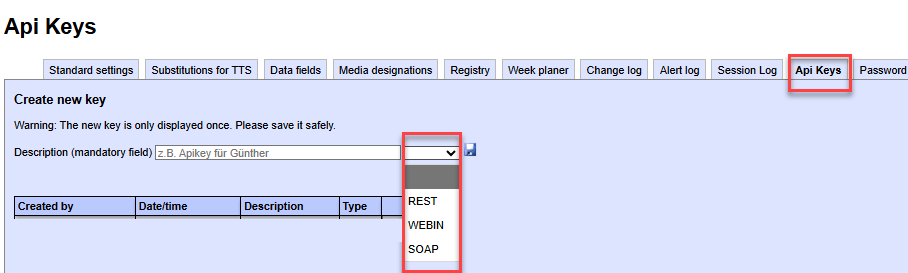
In the “API Keys” menu, you can generate a secure and unique key.
This key is used to remotely trigger alarms via third-party systems.
Depending on the modules you have subscribed to, up to three different communication protocols are available to you:
- REST interface (optional)
- Webin - a standard HTTPS-based interface
- SOAP interface (optional)
REST interface
One of our specialists is available to assist you with the implementation.
Webin - a standard HTTPS-based interface
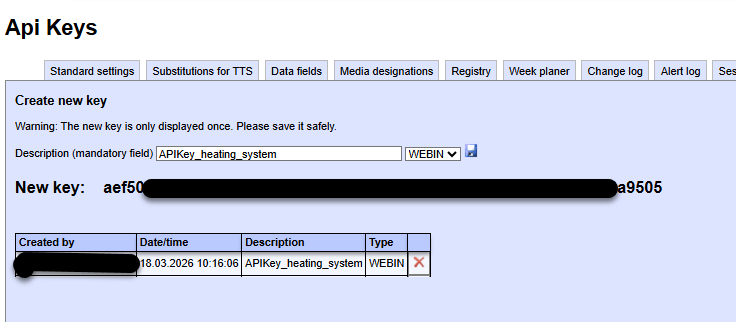
If you want to allow a third-party system to trigger an alert in your account, you must generate a unique key (API key) and then enter it into the corresponding HTTPS link.
Important:
The API key is displayed only once, immediately after creation.
Therefore, make sure to store the key in a secure location.
If you lose the key, you must generate a new API key.
 eAlarm emergency - URL syntax for triggering
Triggering is done via a web link (HTTPS is required) using the alarm text stored in the template.
Example of an alarm template - triggering with standard text
https://emergency.swisscom-alarm.ch/webin.php?apikey=key
&template=xxx
&text=0
&duration=8
Example of an alarm template - triggering with free text (German)
https://emergency.swisscom-alarm.ch/webin.php?apikey=key
&template=xxx
&dtfree=Guten Tag
&duration=8
Parameter description
| Parameter | Description |
|---|---|
| apikey | The generated API key is unique and 64 characters long. |
| template | The trigger code corresponds to the numeric code of the alarm template to be triggered. |
| scenario | The trigger code corresponds to the numeric code of the scenario to be triggered. |
| conference | The trigger code corresponds to the numeric code of the conference to be triggered. |
| event | The trigger code corresponds to the alphanumeric code of the event to be triggered. |
| text | The code of the alarm text to be used. If the parameter is missing, a free text is sent. If the code is set to 0, the default text is sent. |
| xxfree |
Free text included in the URL in the corresponding language. Available options: - dtfree for German - frfree for French - itfree for Italian - enfree for English |
| duration | Duration (in minutes) after which the alarm automatically ends. If the parameter is missing, the alarm remains active until the global default duration is reached or the alarm is manually terminated. |
Multilingual Alerts
Multilingual alerts can be sent via the web link by setting the various xxfree parameters in sequence:
&dtfree=Guten Tag&frfree=Bonjour&enfree=Good morning
Each alarm recipient automatically receives the text in the language defined for them (if available).
⚠️ If the text parameter is present, the xxfree parameters are not evaluated.
QR code generation for alerts
If you enter the URL syntax shown above into a
➡️ QR code generator, you can generate a QR code for triggering the alert.
Practical use
- You can attach the generated QR code to an emergency or alarm board.
- Simply scanning it with a smartphone or other device triggers the alarm immediately.
- This procedure enables fast and efficient alerting, e.g., of the on-site medical team, the emergency response team, or other predefined response groups.
Responses to the trigger web link request
Depending on the language set in the “Language Remote Alerting” registry key, the web link returns the following response messages:
| Typ / Auslöser | Deutsch (de) | Französisch (fr) | Italienisch (it) | Englisch (en) |
|---|---|---|---|---|
| Template (Vorlage) | OK: Alarm erfolgreich ausgelöst. Text: xxx Teilnehmer: 1 alarmiert. (AKEY-xxx) |
OK : Alarme déclenchée avec succès. Texte : xxx Participants : 1 alerté. (AKEY-xxx) |
OK: Allarme attivato con successo Testo: xxx Partecipanti: 1 allertato. (AKEY-xxx) |
OK: Alert successfully triggered Text: xxx Participants: 1 alerted. (AKEY-xxx) |
| Drehbuch (Scenario) | OK: Drehbuch erfolgreich ausgelöst. (BKEY-xxx) | OK : Scénario déclenché avec succès. (BKEY-xxx) | OK: Scenario attivato con successo. (BKEY-xxx) | OK: Scenario successfully triggered. (BKEY-xxx) |
| Konferenz | OK: Konferenz erfolgreich ausgelöst. (CKEY-xxx) | OK : Conférence déclenchée avec succès. CKEY-xxx) | OK: Conferenza attivata con successo. CKEY-xxx) | OK: Conference successfully triggered. CKEY-xxx) |
| Ereignis | Event Trigger processed: OK: Alarm ‘xxx’ erfolgreich ausgelöst. Text: xxx Teilnehmer: 1 alarmiert. (AKEY-xxx) |
Event Trigger processed: OK: Alarme déclenchée avec succès à ‘xxx’. Texte: xxx participant(s): 5 alarmé(s). (AKEY-xxx) |
Event Trigger processed: OK: Allarme ‘xxx’ lanciato con successo. Testo: xxx Utenti: 1 Allarmato. (AKEY-xxx) |
Event Trigger processed: OK: Alert ‘xxx’ successfully triggered. Text: xxx Subscriber: 1 alerted. (AKEY-xxx) |
| Template / Drehbuch / Konferenz fehlerhaft | Not_OK: Alarmvorlage, Konferenzvorlage oder Drehbuch nicht gefunden. | Not_OK : Modèle d’alarme, conférence ou scénario introuvable. | Not_OK: Modello d’allarme, conferenza o scenario non trovato. | Not_OK: Alarm template, conference or scenario not found. |
| Ereignis fehlerhaft | Not_OK: Event nicht gefunden | Not_OK: Evénement non trouvé | Not_OK: Evento non trovato | Not_OK: Event not found |
| Ping‑Rückmeldung | OK: Ping‑Ereignis verarbeitet. | OK : Événement de ping traité. | OK: Evento di ping elaborato. | OK: Ping event processed. |
| Fehlerhafte Zugangsdaten | Not_OK: Falsche oder nicht existierende Anmeldedaten oder IP‑Adresse gesperrt. | Not_OK : Données d’identification erronées ou adresse IP bloquée. | Not_OK: Credenziali errate o indirizzo IP bloccato. | Not_OK: Invalid credentials or IP address blocked. |
Technical Note
- The language of the feedback is determined by the registry entry:
HKEY_LOCAL_MACHINE\SOFTWARE\Swisscom\eAlarm\Language Remote Alerting - Valid values are: de, fr, it, en.
- If the entry is missing or set incorrectly, English is used.
SOAP Interface
Setting up a connection for the third-party system via SOAP is done with the support of one of our specialists.